If you run a construction, trade or equipment hire business, your website has a simple job.
It needs to help the right people understand what you do, find the service they need and contact you without unnecessary friction.
That is where accessibility in web design becomes practical.
It is not about adding technical features for the sake of it. It is about removing things that make a website harder to read, harder to navigate or harder to use.
If someone searches “excavator hire Brisbane”, lands on your website and cannot quickly work out what machines you have, where you deliver or how to request a quote, the website is creating a problem.
Improve the way the site is structured and used, and the benefit is straightforward: the customer gets to the information faster and has a clearer path to enquiry.
What Is Accessibility in Web Design?
Accessibility in web design means making a website easier for more people to read, navigate and use. That includes improving text, colours, menus, buttons, forms, images and page structure so visitors can get to the information they need without the design becoming an obstacle.
For a construction or hire business, that usually comes back to practical questions:
Can people read the page easily?
Can they find the service they need?
Can they understand what you offer?
Can they use the site properly on a phone?
Can they complete an enquiry without getting stuck?
If the answer is no, there is friction in the website.
Fixing that friction improves the experience for the visitor and gives the business a better chance of turning that visit into a genuine enquiry.
Why Is Accessibility Important for a Business Website?
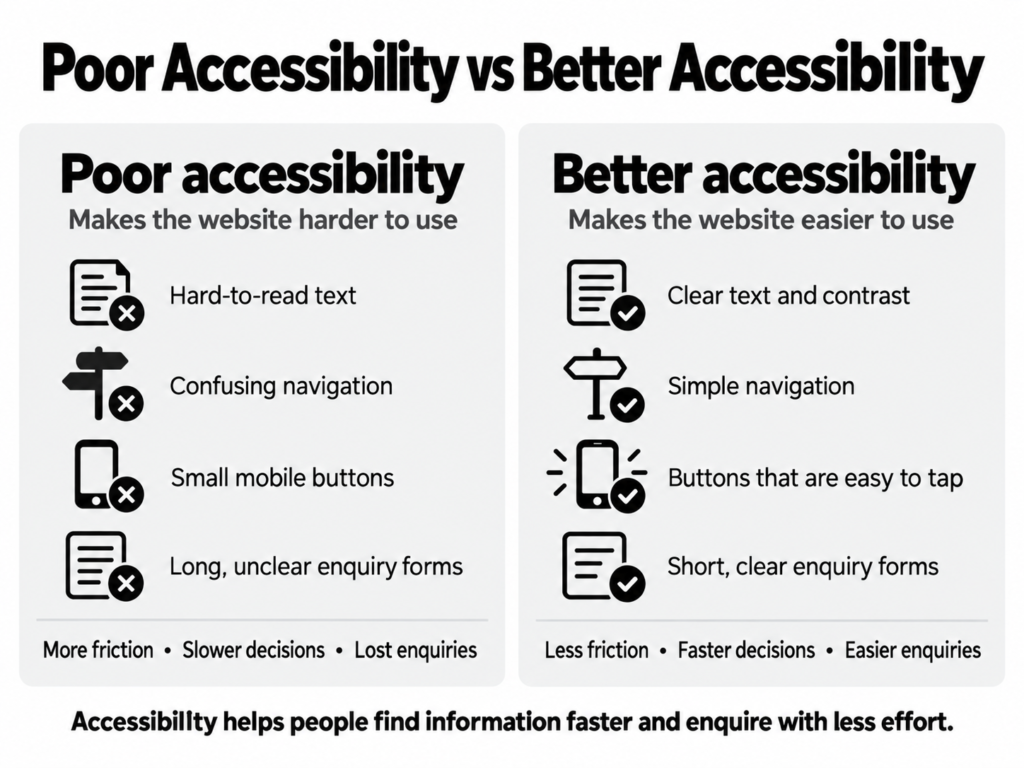
Accessibility is important because every unnecessary obstacle makes it harder for a potential customer to use your website. When pages are easier to read, navigation is clearer and forms are simpler to complete, visitors can make decisions faster and move towards contacting the business with less effort.
The connection is simple.
Poor contrast → harder to read → customer misses important information.
Confusing navigation → harder to find services → customer leaves before reaching the right page.
Unclear enquiry form → harder to contact you → potential quote request is lost.
Small buttons on mobile → harder to use → visitor becomes frustrated.
Accessibility improves those areas because it focuses on making the website easier to use.
For a builder, subcontractor or hire company, the benefit is not theoretical. It affects how easily a potential customer can move from a Google search to a service page and then to an enquiry.
How Does Accessible Web Design Help Your Customers?
Accessible web design helps customers get information with less effort. Clear text, simple navigation, obvious buttons and usable forms reduce the number of things a visitor has to work out before they can decide whether your business is suitable for the job.
A customer looking for a contractor does not want to study your website.
They want answers.
They may need to know:
- what services you provide
- what type of work you take on
- where you operate
- what equipment you have
- whether you handle commercial or civil work
- how to request a quote
The easier those answers are to find, the easier the website is to use.
That is the practical benefit of accessibility.
Clearer text helps people understand your service faster
If text is too small, crowded or difficult to read against the background, visitors have to work harder to understand the page.
Improve the font size, spacing and colour contrast, and the benefit is immediate: the content becomes easier to scan.
For someone comparing several contractors, that can mean they understand your capability faster.
Better navigation helps people reach the right service
A construction business may offer multiple services.
A hire company may have several equipment categories.
If those services are buried inside unclear menus, customers have to search around.
Improve the menu structure and page hierarchy, and the benefit is that people can reach the right part of the site sooner.
For example:
Before: Services → More Services → Equipment → Plant → Excavators
Better: Equipment Hire → Excavator Hire
The second path asks less from the customer.
Better buttons make the next step obvious
Buttons such as “Learn More” or “More” can be vague.
A clearer button tells the visitor what will happen.
Examples include:
- Request a Quote
- View Excavator Hire
- See Our Civil Services
- Enquire About Equipment Hire
- Contact Our Team
The improvement is clearer wording.
The customer benefit is that they know where the button will take them before they select it.
Common Website Problems That Make Enquiries Harder
Accessibility problems often appear as ordinary website problems. They make customers work harder to understand the business, find a service or complete an enquiry. Identifying those issues gives you a practical list of things that can be improved rather than another layer of marketing theory.
Common examples include:
- text that is difficult to read
- too much text packed into one section
- menus with too many options
- service names that are unclear
- small buttons on mobile
- contact details buried at the bottom of the page
- forms with too many unnecessary fields
- unclear error messages
- important information placed inside images
- pages without clear headings
- buttons that all say “Learn More”
- mobile pages that require zooming
- inconsistent layouts between service pages
Each problem creates a small amount of friction.
Enough small problems can make a website feel difficult even when the visitor cannot explain exactly why.
How We Review Website Accessibility at On Site
We look at accessibility as part of the wider website experience. The aim is to understand where potential customers are having to work harder than they should, fix those areas and create a clearer structure that can support the business as new services, projects or locations are added.
Our approach is Audit, Fix, Grow.
Audit
We review the current website to understand what is working, what is unclear and where users may be dropping out.
That can include:
- service navigation
- mobile layout
- text readability
- page structure
- buttons
- forms
- calls to action
- contact pathways
- images
- internal links
The question behind the audit is simple:
What is making it harder for a potential customer to understand the business or send an enquiry?
Fix
Once the problems are clear, we improve the parts of the website that are getting in the way.
That may mean:
- simplifying menus
- improving service pages
- making buttons clearer
- adjusting mobile layouts
- improving text contrast
- reducing unnecessary form fields
- making contact options easier to find
- reorganising content
- improving page consistency
Each fix should have a reason behind it.
We are not changing the website because a design trend says we should.
We are changing it because the customer will find the site easier to use.
Grow
As the business expands, the website needs to stay organised.
New service pages, equipment categories, project pages and locations should follow the same structure.
That helps prevent the website from becoming cluttered again six or twelve months later.
The benefit is a site that can grow with the business without becoming harder for customers to navigate.
A Simple Accessibility Check for Your Website
The fastest way to spot accessibility and usability problems is to use your website as a customer would. Start from a service search, open the page on a phone and see how easily you can understand the service, find supporting information and complete an enquiry.
Ask yourself:
- Can I tell what this page is about within a few seconds?
- Is the text comfortable to read?
- Can I find the main services from the menu?
- Are the buttons clear?
- Can I use the site properly on my phone?
- Is the contact option easy to find?
- Does the enquiry form ask only for useful information?
- Can I understand what happens after I submit it?
- Can I move to another relevant service without going back to Google?
If several answers are no, the website is making customers do more work than necessary.
That is usually where the first improvements should start.
Make It Easier for Customers to Use Your Website
A construction or hire website should help customers get answers quickly.
They should be able to understand what you do, find the right service and contact you without the website making the process harder.
That is the value of accessibility.
At On Site Marketing, we look at web design from the point of view of the customer using it and the business relying on it for enquiries. We review what is getting in the way, fix the problem areas and build a clearer website structure around your services, locations and enquiry pathways.
If your website looks reasonable but customers still struggle to find information or reach the right page, the problem may be in the way the site is structured and used.
Let’s talk about your next stage of growth.